Heartbroken portrait AI prompts: 6 subtle sad expression edits
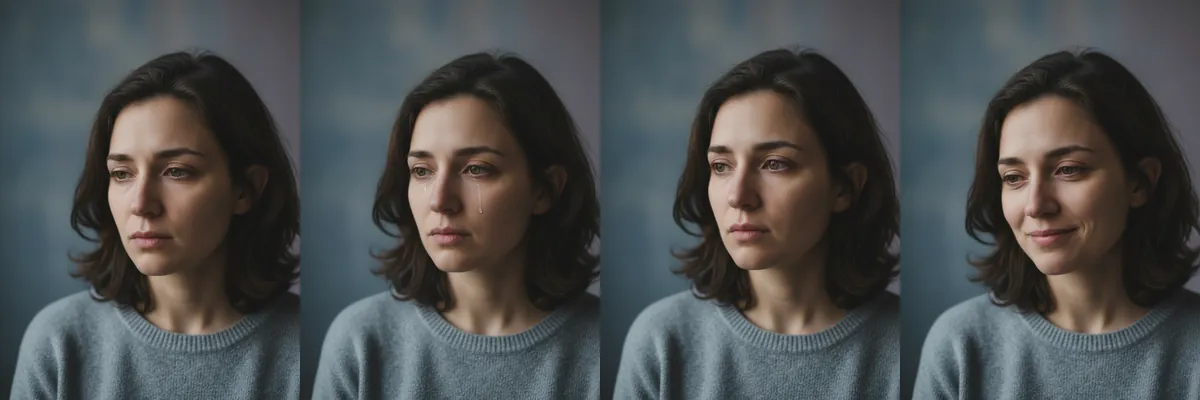
These prompts don't create a new scene. They edit the expression on a photo you already have, adding sadness, longing or quiet thought for a music cover, a short film still or an emotional post.
Each edit is a Reshot AI template you can open with a photo in the iPhone app, or copy into another editor. Every prompt asks to keep everything else unchanged, so the outfit, light and background stay as they were.
How these templates use your photo
Each template starts from a photo you pick. The prompt tells the model what to change, and your photo is the reference for everything else. Clear, front-facing photos with even light give the closest match.
1. Furrowed brow in thought

A slight furrow added between the brows to suggest deep contemplation, with the gaze held down and to the side. Only the expression changes, while hair, sweater and background stay the same.
Keep everything unchanged and apply a slight furrowed brow expression, suggesting deep contemplation
2. A single tear

A subtle tear added to one eye and running down the cheek, for an emotional close-up. The rest of the photo, including pose and lighting, is left unchanged.
Keep everything unchanged and apply a subtle tear in one eye, enhancing the emotional depth.
3. Distant, longing stare

A distant stare that looks past the camera, suggesting longing or memory. The prompt keeps everything else untouched, so only the eyes and the set of the face shift.
Keep everything unchanged and apply a distant stare, conveying a sense of longing
4. Forlorn half smile

A small forlorn smile with lowered eyes that hints at sadness underneath. The mouth and eyes change while the outfit, hair and backdrop stay as in the original.
Keep everything unchanged and apply a forlorn smile, hinting at underlying sadness
5. Downturned gaze

The eyes drop toward the floor with a heavier, downturned look that reads as loss. Nothing outside the expression is edited.
Keep everything unchanged and apply a downturned gaze, emphasizing feelings of loss
6. Searching, contemplative look

A quieter contemplative expression with a steady sideways gaze, suggesting someone working something out. The prompt leaves the rest of the photo as it was.
Keep everything unchanged and apply a contemplative expression, suggesting a search for resolution
How to use these templates in Reshot AI
- Open Reshot AI on iPhone and find the Heartbroken Portraits category on the home screen.
- Pick a template. Choose a clear, front-facing selfie with good light; it is the reference for your face.
- Generate. Results arrive in the app’s History, so you can come back for them later.
- Want a different expression in the result? Open it in the Face Editor and add a smile, open closed eyes, or turn the head.
Frequently asked questions
Will the result look like me?
Each template uses your photo as the reference and describes the look, not a new face. Clear, front-facing photos with even light give the closest match.
Can I use these prompts outside Reshot AI?
Yes. The copy button gives you the full prompt; it works in any image tool that accepts a reference photo. Results will differ by model.
Is Reshot AI free?
The app is free to download. Generating templates uses credits or a Premium subscription; details are in the app.
Try Heartbroken Portraits in Reshot AI
Download Reshot AI, pick a template, choose a selfie.
⬇ Download on the App Store